
World Outliner
Lite Editor Tool
The World Outliner integration shows J2 tag information directly in the Actor list. It is meant for quick scanning without opening the Details panel or Assignments Panel.
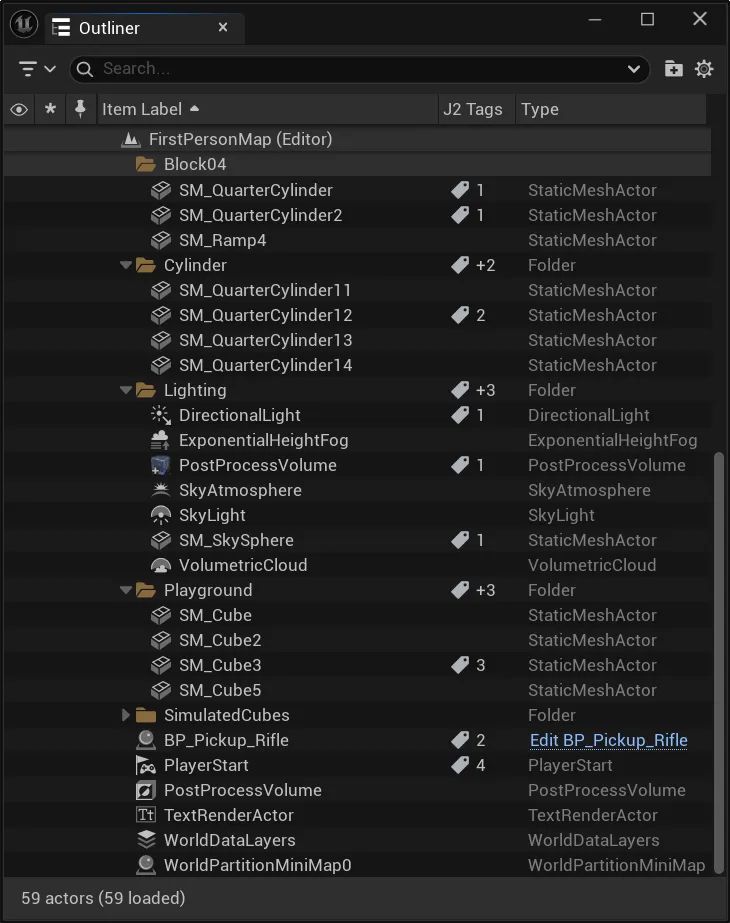
What It Shows
Section titled “What It Shows”| Display | Meaning |
|---|---|
J2 Tags column | Dedicated Outliner column for tag status. |
| Tag icon | The Actor has J2-relevant Actor or Component tags. |
| Tag count | Number of detected tags or grouped child tag count. |
| Tooltip | Exact tag names when available. |
Use Cases
Section titled “Use Cases”The Outliner column is useful for:
- quickly checking selected Actors
- spotting untagged or heavily tagged objects
- verifying copy/paste or bulk actions
- orienting before deeper analysis in the Assignments Panel
Settings
Section titled “Settings”In Pro projects, the integration can be disabled here:
Project Settings | Plugins | J2 Tags | Enable Outliner Integration