
Behavior System Overview
The Behavior System is a Pro feature for editor-side automation. A behavior reacts to a tag-related event, checks whether it is allowed to run, evaluates its conditions, and then executes its actions.
Behaviors are stored in J2 Tag Behavior Library assets. They can be mapped to a TagSet, a group, or a single tag.
Main Flow
Section titled “Main Flow”The whole system can be understood as one pipeline: an event creates context, the mapping finds the relevant behavior, settings decide whether it can run, conditions are evaluated, and actions perform the result.
-
Event Trigger
Tag, Actor, Component, Asset, or manual trigger creates the execution context.
-
Find Behavior
J2 Tags resolves the matching Tag, Group, or TagSet behavior mapping.
-
Check Settings
Scope, enabled state, trigger mode, and behavior options decide if it may run.
-
Evaluate Conditions
Expressions and operators calculate whether the following actions should execute.
-
Execute Actions
Actions apply the behavior result: tags, diagnostics, logs, cleanup, or automation.
Editor Layout
Section titled “Editor Layout”| Area | Purpose |
|---|---|
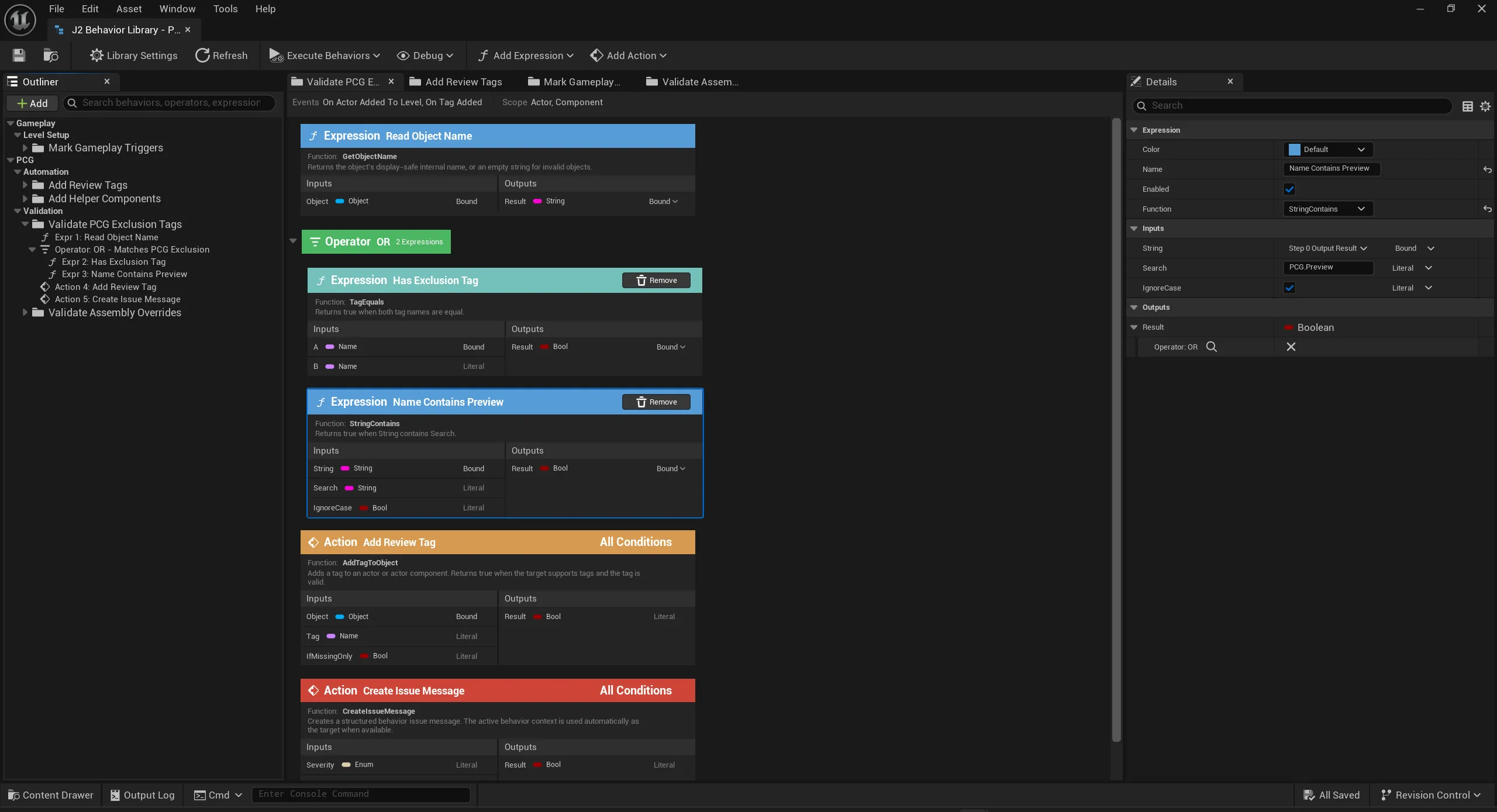
| Toolbar | Save, refresh, execute behaviors, toggle debug display, add expressions, and add actions. |
| Outliner | Behavior folders, groups, operators, expressions, and actions. |
| Main canvas | Card-based sequence of expressions, operators, and actions. |
| Details panel | Inputs, outputs, literal values, bindings, colors, and other selected-card settings. |
What a Behavior Contains
Section titled “What a Behavior Contains”Expressions read data or calculate values. They are used for checks such as “does this Actor have another tag?” or “is the selected asset in the expected folder?”.
In the card view, expression cards are blue. They show inputs, outputs, bound values, and literal values.
Operators combine expression results into a condition. They define whether following actions should run.
In the card view, operator cards are green. They group expressions with logic such as OR or AND.
Actions do the actual work. They can add or remove tags, report Diagnostics issues, log information, add or remove components, or run another behavior.
In the card view, action cards are orange or red. Each action shows the function name, condition mode, inputs, outputs, and binding state.
Input overrides let a TagSet, group, or tag mapping provide different values without duplicating the behavior asset. This keeps one behavior reusable across multiple tag areas.
How It Runs
Section titled “How It Runs”Cards are evaluated from top to bottom. Conditions created by expressions and operators apply to the actions below them. If several actions follow the same condition, they share that condition until new expression/operator cards change the evaluation state.
Manual-trigger behaviors can be executed from editor tooling. Event-triggered behaviors run when the matching tag, Actor, Component, or Asset event occurs.
Mapping
Section titled “Mapping”Behaviors can be attached at three levels:
| Level | Use for |
|---|---|
| TagSet | Default behavior for a whole defined tag collection. |
| Group | Behavior for a branch of related local tags. |
| Tag | Behavior for one concrete tag. |
Group and tag mappings can inherit behavior from higher levels or provide local behavior sections. Use higher-level mappings for shared rules, and tag-level mappings when only one tag needs special handling.